Custom Webclip Icons for your iPhone or iPod Touch Home Screen
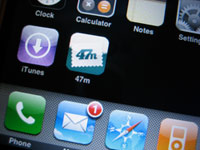 So some of you may have heard about the iPhone, iPod Touch update yesterday that lets you add shortcuts on your home screen to webpages. My iPhone does a nice job of taking a screenshot of the page I’m on and making a pretty little icon that looks like my other icons on the home screen. But wait! I want my logo and not a tiny version of the whole page! Turns out it’s super simple to have your custom icon show up.
Ready? Make an icon that’s 158x158. Save it as “apple-touch-icon.png,” and put it in the root folder of your website. Wow that was easy.
But what if you need a different icon for a different directory on your server? Cameron Hunt has our quick fix. Put this line of code in your head tag:
<head>
  <link rel="apple-touch-icon" href="iphone.png"/>
</head>
Put the “iphone.png” file wherever you want and link to it!
Do keep in mind that the iPhone or iPod touch will automatically round the corners and give it the glassy overlay, and keep a few spare pixels around the edge as it seems to clip them. Also, the 158x158 size is because of the high resolution displays that Apple uses. When it gets scaled down, it looks nice and crisp like the factory set.
Thanks to Dan Dickinson and Playground Blues for their work.
Enjoy!
Comments
1
Mike Keen - Jan 19, 2008
2
Fubiz?™ - Jan 20, 2008
3
John - Feb 08, 2008
4
Berry Tree - Mar 08, 2008
5
personalized dog tags - Apr 01, 2008
6
ipod blogger - May 08, 2008
7
Spammy the Spammer - May 14, 2008
8
Adam - May 20, 2008
9
iphone downloads - Jun 04, 2008
10
az bookkeeping - Aug 11, 2008
11
Richard - Aug 14, 2008
12
Barry - Feb 17, 2009
13
Oyun Oyna - Sep 02, 2009
14
Bands - Sep 22, 2009
15
Barry - Oct 30, 2009
16
Slimboy - Sep 20, 2011
Jonathan Longnecker - Sep 20, 2011
18
Cherif - Oct 01, 2012
19
Grenionry - Oct 28, 2012
20
hairlosscure - Feb 16, 2015