Setting Up Custom Category URL Structures in ExpressionEngine
We just finished up a particularly fun project, Casillas, Inc. They’re an amazing custom furniture maker in California. In an odd turn of events, we actually did very little design for the site and became the “backend guys” if you will. As we got into how we wanted the site to be structured we realized that because of the product names (all numbers) we needed to use the category that the product was part of in the URL structure. So for example it would read:
http://site.com/products/sofas/10-123/
And if the user accesses:
http://site.com/products/sofas/
Then all the sofas get shown. Back one more and all the categories. Great! Now how in the world do we do that with ExpressionEngine?
First Problem
By default, EE uses either the category ID number to display all the entries in that category:
http://site.com/products/C12
Or you can turn on URL titles and choose your “trigger” word. So if category was the trigger the URL would be:
http://site.com/products/category/sofas
Hence, we need to figure out how to remove the category trigger.
Second Problem
We want the URL title of the entry (the product number in this case) to immediately follow the category name. And we want that URL scheme to be the permanent location of the product. Because this isn’t how EE works out of the box, there is potential to trip us up down the road and make it hard to create those permalinks reliably. Can we do it? You bet we can!
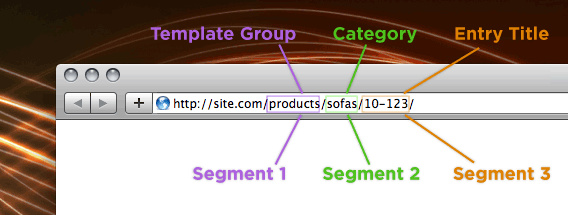
The Solution
As you can see in the diagram above, we’re going to harness the power of segment variables to make our magic happen. What are segments? Well, it’s pretty easy. Segment 1 is the first section in your URL after your .com, Segment 2 is the next and so on. EE will handle up to 9! I hope I hope I never have to use that many.
First, we need to setup our template group (products in this case) and then on the index template inside that group we begin our work. We’re actually going to manage to put all of this in one template using if statements. Yep, that blew my mind the first time, too. Keep in mind that all this code has been stripped down to bare minimum to keep it easier to follow. My template code for this page was pretty large with all the HTML markup in it.
We’ll start with the categories page:
{if segment_2=="" AND segment_3==""}
{exp:weblog:categories weblog="products" style="linear"}
    <p><a href="{path="products/{category_url_title}"}">
    {category_name}</a></p>
{/exp:weblog:categories}
Here we tell EE that if Segment 2 and 3 are empty, we use this part of the template. Then we use the weblog:categories tag to list the categories and make them links.
Second is the category entries page:
{if:elseif segment_2!="" AND segment_3==""}
{exp:query sql="SELECT cat_id FROM exp_categories WHERE
cat_url_title = '{segment_2}'"}
    {exp:weblog:entries weblog="products" category="{cat_id}"}
        <p><a href="{title_permalink={segment_1}/{segment_2}}">
        {title}</a></p>
{/exp:weblog:entries}
{/exp:query}
Here we continue the if statement by saying that if Segment 2 has something in it and Segment 3 is empty we use this part of the template. Add to that a little SQL Query magic to pull the category ID from the category URL and then you can start making your links to the products. Notice you need to pass the category ID to the weblog loop and then you can use the title permalink in conjunction with the first two segment variables.
And finally the single entry:
{if:elseif segment_3!=""}
{exp:weblog:entries weblog="products" limit="1"
url_title="{segment_3}"}
    Call whatever custom fields you have here
{/exp:weblog:entries}
{/if}
If Segment 3 is populated then we look for the entry inside it and pull the data. It gets more complicated after that to use permalinks and title paths, but we didn’t run into an issue we couldn’t get past. And don’t forget, you can go to http://casillasinc.com/products/ and click around to see how it works. Also, before you think I’m a mad genius or something, this is based on some excellent work by a guy named “TheStig” in the EE forums. The only credit I can take is for making it a little easier to understand  .
.
Due to line breaks and such I’ve put all of the above together for you in one file so it will be easy to get started. Have fun!
Download: the template code.
Edit: Be aware that next/previous linking and pagination won’t work with this method. For next/previous linking this might help: Nearby Entries
Comments
1
vlado varbanov - May 21, 2009
2
Ben - May 21, 2009
3
Ryan Masuga - May 21, 2009
4
Martin Luff - May 21, 2009
5
Josh - May 24, 2009
Jonathan Longnecker - May 25, 2009
7
joe - May 26, 2009
8
John Faulds - May 27, 2009
9
Low - May 27, 2009
10
Ryan Masuga - May 27, 2009
Jonathan Longnecker - May 27, 2009
12
Ben Carlson - May 27, 2009
13
Mike Kroll - May 29, 2009
Jonathan Longnecker - May 29, 2009
15
earph - Jun 04, 2009
16
earph - Jun 04, 2009
17
earph - Jun 04, 2009
Jonathan Longnecker - Jun 05, 2009
19
earph - Jun 05, 2009
Jonathan Longnecker - Jun 05, 2009
21
earph - Jun 11, 2009
Jonathan Longnecker - Jun 11, 2009
23
earph - Jun 11, 2009
Jonathan Longnecker - Jun 11, 2009
25
earph - Jun 11, 2009
Jonathan Longnecker - Jun 12, 2009
27
earph - Jun 15, 2009
Jonathan Longnecker - Jun 17, 2009
29
Honest Roman - Jun 17, 2009
Jonathan Longnecker - Jun 17, 2009
31
Mike Stecker - Jul 07, 2009
Jonathan Longnecker - Jul 07, 2009
33
vlado varbanov - Jul 23, 2009
Jonathan Longnecker - Jul 23, 2009
35
earph - Jul 23, 2009
Jonathan Longnecker - Jul 23, 2009
37
earph - Jul 23, 2009
Jonathan Longnecker - Jul 23, 2009
39
Clayton Cafiero - Jul 26, 2009
40
Mark - Aug 07, 2009
Jonathan Longnecker - Aug 07, 2009
42
Nathan - Sep 09, 2009
43
Ty - Oct 06, 2009
Jonathan Longnecker - Oct 06, 2009
45
Tejas - Dec 08, 2009
Jonathan Longnecker - Dec 08, 2009
47
brad - Jan 15, 2010
Jonathan Longnecker - Jan 15, 2010
49
brad - Jan 16, 2010
Jonathan Longnecker - Jan 16, 2010
51
bjorn - Mar 18, 2010
52
vincent - Jul 01, 2010
Jonathan Longnecker - Jul 02, 2010
54
Seb Neerman - Jul 29, 2010
Jonathan Longnecker - Jul 29, 2010
56
vincent - Aug 02, 2010
Jonathan Longnecker - Aug 03, 2010
58
vincent - Aug 05, 2010
59
Willia, - Aug 08, 2010
Jonathan Longnecker - Aug 09, 2010
61
William - Aug 09, 2010
Jonathan Longnecker - Aug 09, 2010
63
William - Aug 09, 2010
Jonathan Longnecker - Aug 09, 2010
65
Richard Wiggins - Sep 22, 2010
Jonathan Longnecker - Sep 22, 2010
67
Richard Wiggins - Sep 22, 2010
Jonathan Longnecker - Sep 22, 2010
69
Chris Arnold - Oct 14, 2010
70
Chris Arnold - Oct 14, 2010
Jonathan Longnecker - Oct 15, 2010
72
Andy Krier - Dec 07, 2010
Jonathan Longnecker - Dec 08, 2010
74
Bransin - Feb 07, 2011
Jonathan Longnecker - Feb 07, 2011
76
Richard - Jun 13, 2011
Jonathan Longnecker - Jun 13, 2011
78
Richard - Jun 13, 2011
Jonathan Longnecker - Jun 14, 2011
80
Ian Ryde - Sep 11, 2011
Jonathan Longnecker - Sep 12, 2011
82
Ian Ryde - Sep 12, 2011
83
DSLR-A850 - Nov 16, 2011
84
William - Dec 22, 2011
Jonathan Longnecker - Dec 22, 2011
86
William - Dec 23, 2011
87
Dissertation - Apr 16, 2012
88
Martin Berglund - May 01, 2012
Jonathan Longnecker - May 01, 2012
90
Martin Berglund - May 07, 2012
91
Steve - Jul 03, 2012
92
bloggridnt - Aug 27, 2012
93
Das - Aug 28, 2012
94
Isaac Raway - Nov 29, 2012